
Code First Azure Digital Twins — a first look(6 min read)

Telstra has a large Internet of Things portfolio, with Digital Twins one of the focus areas for Telstra Purple professional services. All major providers are supported, including Azure Digital Twins.

The team recently took some core bits out of project they are working on with code first Azure Digital Twins and have released it as an open source library, so I thought I would share an initial look at the project.

Why code first? Using a code first approach can make accessing Digital Twins easier for developers. They can use their native programming language and tools to develop their models, without having to learn the intricacies of DTDL (Digital Twins Definition Language) or the REST APIs for interacting with Azure Digital Twins.

The library can be found at https://github.com/telstra/DigitalTwins-CodeFirst-dotnet
Continue reading Code First Azure Digital Twins — a first look(6 min read)

Azure CLI vs PowerShell vs ARM vs Bicep(14 min read)

A key component of DevSecOps is infrastructure-as-code, and if you are using Azure there are multiple ways to specify what you want.

Microsoft provides Azure PowerShell, the Azure CLI, as well as both Azure Resource Manager (ARM) and the newer Bicep templates. There are also third party (and cross-cloud) solutions such as Terraform and Pulumi.

In the past I have been leaning towards Azure CLI, as I found ARM templates a bit cumbersome, plus my previous experience with migrations vs desired state for database deployments. With Bicep being promoted as a lighter weight alternative I thought I would compare the Microsoft alternatives.

Having now revisited the options, I still prefer scripting, but think I will switch more to PowerShell, particularly as it makes it easier to follow to the tagging, and naming, guidelines.

My recommendations:

  • For incremental development or changing environments, use Azure PowerShell scripts. They allow easy manipulation of parameters, and a migration/scripted approach can handle changes that a desired state/template approach can not.
    • If you are already heavily invested in an alternative scripting system, e.g. Bash, then Azure CLI would be easier to use.
  • If you have relatively stable infrastructure, such as a preset development environment or sample/demo code, that you want to repeatedly tear down and then recreate the same, then Bicep offers a nicer syntax than raw ARM templates. The deployments are viewable in the Azure portal, but templates do have some limitations compared to scripting.
  • In either case, follow the Azure Cloud Adoption Framework naming guidelines, allowing for unique global resources, as well as the associated tagging guidelines.

Example code is available on Github at https://github.com/sgryphon/azure-deployment-examples

Continue reading Azure CLI vs PowerShell vs ARM vs Bicep(14 min read)

RPG Mechanics: Fate Core(11 min read)

Having a background in statistics, I like evaluating the mechanics of roleplaying game systems. I have previously blogged how 3d6 is not less swingy than d20 comparing different types of systems at a high level.

This post is a more detailed dive into Fate Core (the 4th edition), which has a bell curve based dice result distribution.

Fate Core is an open source roleplaying game, available under both OGL and Creative Commons licences, with several published books (available both printed and as nicely formatted PDFs). The Fate Accelerated Edition (FAE) version is a short (only 40 pages) and lightweight variant of the system, with the recent Fate Condensed a streamlined version of the full system with clarifications and minor updates such as a safety tools section. (All are considered part of the same edition.)

There are several highly rated settings that use different versions of Fate, including Dresden Files, Fate of Cthulhu, Disapora, and Spirit of the Century.

Continue reading RPG Mechanics: Fate Core(11 min read)

Evaluating blockchain networks(5 min read)

What is blockchain? What makes a good blockchain? Is blockchain just a buzzword? Is a blockchain really trustless?

Let's start with the last one. The word trustless is often used to describe blockchain, however it is not really trustless — it would be better described as decentralised trust or systemic trust (trust in the system).

Rather than trust an individual (person or organisation) the trust is provided by the very system itself.

You do need to trust the transaction processors (aka miners) for the chain, and also the programmers that wrote the software being used. However you don't need to trust the individual processors or software, only that the majority are truthful. A characteristic of blockchain is that an individual bad actor, controlling only a small portion of the network, cannot take the network down.

A blockchain network can increase systemic trust through:

  • A large number of processors (e.g. public chain)
  • Multiple clients (i.e. multiple development teams)
  • Open source (allow visibility and the option to reject changes and go a different direction)

Only two major blockchains rate highly on these trust criteria: Bitcoin (BTC) and Ethereum (ETH). There are strong reasons why these have strong support.

Some of the others are trying, but not yet there, and worryingly some of the type cryptocurrencies are not decentralised at all, but actually controlled by a single central organisation.

Continue reading Evaluating blockchain networks(5 min read)

Crashed blog… now restored(1 min read)

So, I pushed the single-server Kubernetes cluster that I was running my blog on a little too far, and it crashed into a bit of a heap. The pods running the different sites, including this blog, failed, and the underlying database got corrupted.

It has been down for a few weeks now. Initially I thought it was just a server issue and rebooted. When it didn't come up, I did little bits of investigation over the following weeks, just a few hours at a time, to figure out the issue.

I managed to work out how to restore the database and get it working, but the server was not stable. It would quickly crash, and trying to activate more than one site would just cause problems.

Kubernetes is quite complicated, and there is a lot of overhead for a single server. It was still a good exercise to understand the complexities of deploying Kubernetes on IPv6.

Now, deploying multiple services via containers is still a good approach, with Kubernetes simply a way to orchestrate, and manage, a large number of containers. So, I can pretty much just run the same containers, just directly (instead of inside Kubernetes).

As you can see, from this blog entry, my services are now back up and running.

There was still the complexity of running on IPv6 only, which I should probably write up in more detail, but for now a lot of it was based on an article by Stefan Kleeschulte, https://medium.com/@skleeschulte/how-to-enable-ipv6-for-docker-containers-on-ubuntu-18-04-c68394a219a2

Scaling agile – a look at SAFe(10 min read)

One of the cornerstones of agile methods is delivering value – “working software over comprehensive documentation”, “production or it didn’t happen”.

To achieve this, when decomposing stories it is important to keep them independently valuable. Stories are only really finished when they are usable by the end customer.

To focus on progressing stories to completion, you want to minimise work in progress and you want to use a strict stack rank of work – 1st , 2nd, 3rd, etc. (Rather that general priority such as high/medium/low, where you have 20 high priority stories, none of them finished.)

However a stack rank doesn’t scale – if number 1 project in your stack rank has 100 week long tasks, you can’t assign 100 people to the project and have it done in 1 week.

The solution is the proven strategy of divide-and-conquer. If project number 1 can accommodate 20 people, then you assign it 20 people (and probably need to split that into 2 teams), then project 2 might have 10, project 3 has 15 people, and so on.

This means multiple agile teams, that need to co-ordinate, while keeping the overall organisation agile.

The Scaled Agile Framework for Enterprise (SAFe) has an approach that coordinates multiple teams towards common goals, leaves individual teams enough room to be agile, and manages planning horizons to preserve the ability to respond to change.

First we will take a look at the planning process for teams, and how SAFe scales to multiple teams using Program Increments, then we will look at plans vs roadmaps, and preserving team agility.

Continue reading Scaling agile – a look at SAFe(10 min read)

App Insights trace correlation(8 min read)

Application Insights is the application performance monitoring feature of Azure Monitor, and can be used to monitor deployed applications both in the cloud and on premises. App Insights supports W3C Trace Context standard headers to correlate tracing information across different components.

The features of App Insights, and Azure Monitor, are quite broad, whereas developers may want in some cases to filter down and focus on application-specific logging. Trace correlation is an important part of this, to get and end-to-end overview of operations.

To view logs, connect your App Insights instance to a Log Analytics workspace. Within the workspace, General > Logs will provide access to the query editor — you can either user one of the default Queries pop-up or write your own.

For example, to see all recent traces, and the correlation between them you can use a query like:

union AppTraces, AppDependencies, AppRequests
| where TimeGenerated > ago(30m)
   and Properties.CategoryName !startswith "Microsoft"
| sort by TimeGenerated desc
| project TimeGenerated, Type, OperationId, Id, Properties.SpanId, 
   ParentId, ClientType, Message, Name, SeverityLevel, Properties, 
   Properties.CategoryName, OperationName, SessionId,
   UserId, AppRoleInstance

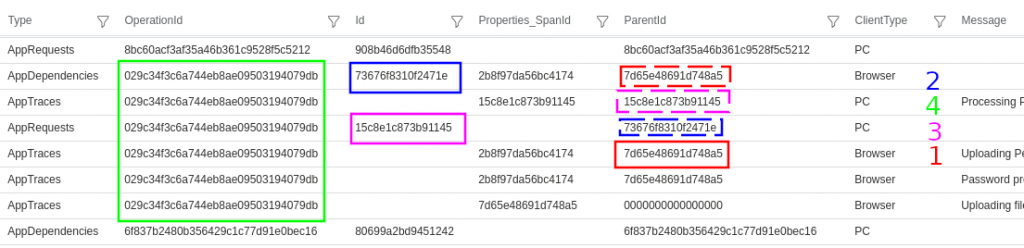
Example output:

This example shows all the traces from one operation are linked to the same OperationId 029c3..., and the parent-child relationship between two tiers client (Browser) and server (PC) can also be determined:

  1. Client (Browser) AppTraces have a ParentId 7d65e...
  2. The client has a link from this parent to a child AppDependency with Id 73676...
  3. On the server (PC) the dependency is recorded as the parent if the AppRequest Id 15c7e...
  4. Additional traces on the server show the request as the ParentId (and there may be further parent-child links depending on the number of tiers).

There are many other types of records that can be queried, for example developers may often be interested in exceptions and traces that feature a particular keyword:

union AppExceptions, AppTraces
| where TimeGenerated > ago(30m)
| sort by TimeGenerated desc
| search "Password"
Continue reading App Insights trace correlation(8 min read)

Apps on Kubernetes IPv6 – Kubeapps, WordPress(8 min read)

Once you have Kubernetes running on IPv6 only the next step is to install some apps.

This is my first post written on my new WordPress instance, hosted on Kubernetes IPv6 only. If you are reading it, then it is working 🙂

Of course apps have their own issues not being configured by default to work with IPv6, so for each app you need to test and work out what configuration details need to be tweaked (assuming the app supports IPv6 in the first place).

To start off with, I installed Kubeapps, to get an application management dashboard, and then used that to install WordPress.

With WordPress installed, I exported the content from my old blog and then imported it into the new instance, and tweaked a few WordPress settings.

The final step was to configure the Mythic Beasts reverse proxy, to make my blog available for legacy IPv4 users.

Continue reading Apps on Kubernetes IPv6 – Kubeapps, WordPress(8 min read)

Kubernetes on IPv6 only(9 min read)

Kubernetes is an open source platform for managing containerised applications.

IPv6 is the next generation Internet protocol, and running on IPv6 only simplifies configuration and administration, and avoids the performance issues and complexities of IPv4 encapsulation, NAT, and conflicting private address ranges.

The default configuration of Kubernetes is IPv4, and there are few, and scattered, examples and guidance for setting up IPv6 dual stack, let alone single stack.

I have collected instructions from the different sources into a single guide to successfully deploy Kubernetes with IPv6 only.

See the guide for full instructions:

https://github.com/sgryphon/kubernetes-ipv6

The blog post contains some additional background on what I did to gett the deployment working. The deployment was tested on Ubuntu 20.04 running on an IPv6 only virtual server from Mythic Beasts.

Continue reading Kubernetes on IPv6 only(9 min read)

IPv6 only hosting(4 min read)

We ran out of IPv4 addresses a few years ago, and the cost has been steadily increasing, now over USD 25.00 per IPv4 address.

Meanwhile we are increasingly using technologies such as containerised deployments and mass deployment of Internet of Things (IoT) devices, seeing an increase in demand for addresses.

About 30% of the Internet now happily talks IPv6, with several countries having more than 50% IPv6, and for a server hosting environment there are many benefits to going IPv6 only.

IPv6 only hosting is available from several providers such as Mythic Beasts.

Continue reading IPv6 only hosting(4 min read)